Multi-Tenancy
Multi-tenancy features including custom tenant hierarchies, granular access control, and automated tenant provisioning are available in Webiny Business and Enterprise tiers.
Since Webiny has all this power and scalability we didn't want to restrict one instance to a single project. Instead, we built Webiny with multi-tenancy in mind, allowing you to manage multiple projects from a single instance. In this lesson, we will explore the concept of multi-tenancy in Webiny and how it can benefit your content management needs.
In this lesson...
Here are the topics we'll cover
What is multi-tenancy and why it matters.
How multi-tenancy is handled in Webiny.
Typical multi-tenancy use-cases.
Advanced multi-tenancy features in Webiny.
What is Multi-Tenancy?
Multi-tenancy is a software architecture pattern where a single instance of an application serves multiple tenants (or clients). Each tenant has its own isolated data and configuration, allowing them to operate independently while sharing the same underlying infrastructure. This approach offers several benefits:
- Cost Efficiency: By sharing infrastructure resources, multi-tenancy reduces cloud costs, making it more affordable to manage multiple projects.
- Simplified Management: With a single instance, updates and maintenance tasks can be performed centrally, reducing administrative overhead.
- Scalability: Multi-tenant architectures can easily scale to accommodate additional tenants without changes to the underlying infrastructure.
- Reusability: Common features and functionalities can be reused across tenants, reducing development time and effort.
How Multi-Tenancy is Handled in Webiny
Webiny implements multi-tenancy through a combination of data isolation and configuration management. Each tenant in Webiny has its own set of content models, pages, assets, and settings, ensuring that their data remains separate and secure.
Many other solutions in the market "simulate" multi-tenancy by using workarounds like using different folders or prefixes for each tenant's data. While this approach can work for simple use-cases, it often leads to complications as the number of tenants grows, such as performance degradation, complex access control, and difficulties in managing tenant-specific configurations.
Inside Webiny, every tenant is fully isolated and it feels like a brand-new instance of Webiny.
By default Webiny has a simple 2-layer tenant hierarchy:
- Root Tenant: The top-level tenant that can manage and oversee all other tenants.
- Child Tenants: Individual tenants that operate independently under the root tenant.
A user account created under the root tenant can access manage the content of child tenants, while users created under a child tenant can only access and manage their own tenant's data. The root-level users can be also restricted so they can only access specific child tenants or none at all.
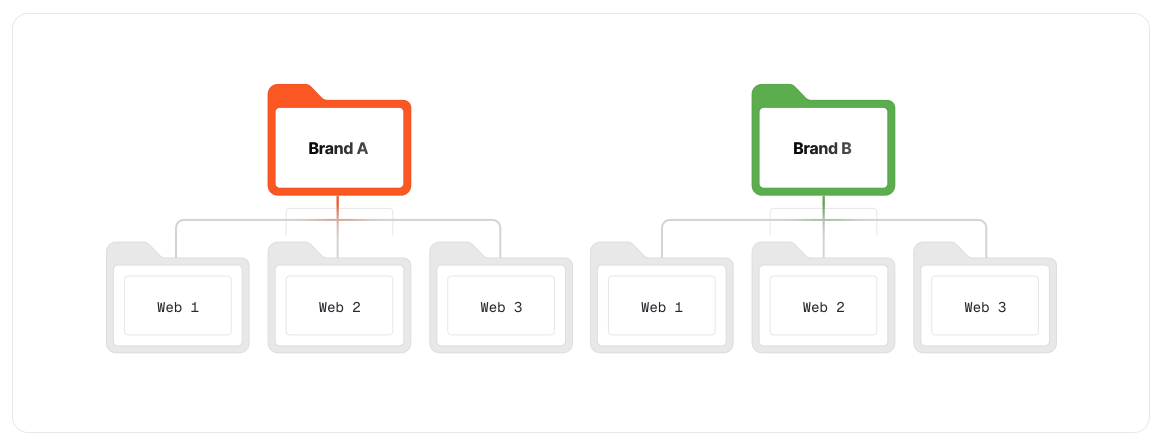
This is the default setup, but Webiny's architecture is flexible and can be extended to support more complex multi-tenant hierarchies if needed. For example, you can implement additional layers of tenants (Root > Brand > Website, Root > Region > Website, ... ) or create custom access control rules to meet specific requirements.
Typical Multi-Tenancy Use-Cases
Multi-tenancy in Webiny is particularly useful in the following scenarios:
- Agencies and Service Providers: Agencies managing multiple client projects can use a single Webiny instance to streamline operations and reduce costs.
- Enterprises with Multiple Brands: Large organizations with multiple brands or divisions can manage their content centrally while maintaining brand-specific configurations.
- SaaS Products: SaaS providers can embed Webiny into their offerings to provide content management capabilities to their users without the need for separate instances.
- Educational Institutions: Universities and schools can manage content for different departments or courses from a single Webiny instance.
Advanced Multi-Tenancy Features
Webiny offers several advanced features to enhance multi-tenancy management:
- Custom Tenant Hierarchies: Extend the default tenant structure to create more complex hierarchies based on your organizational needs.
- Granular Access Control: Implement fine-grained access control policies to restrict user permissions at the tenant level.
- Tenant-Specific Configurations: Customize settings and configurations for each tenant to meet their unique requirements.
- Automated Tenant Provisioning: Use scripts or APIs to automate the creation and management of tenants, streamlining onboarding processes
- Content inheritance & sharing: Set up content sharing or inheritance between tenants to facilitate collaboration and reuse of content across different projects.