Application Deployment Stacks
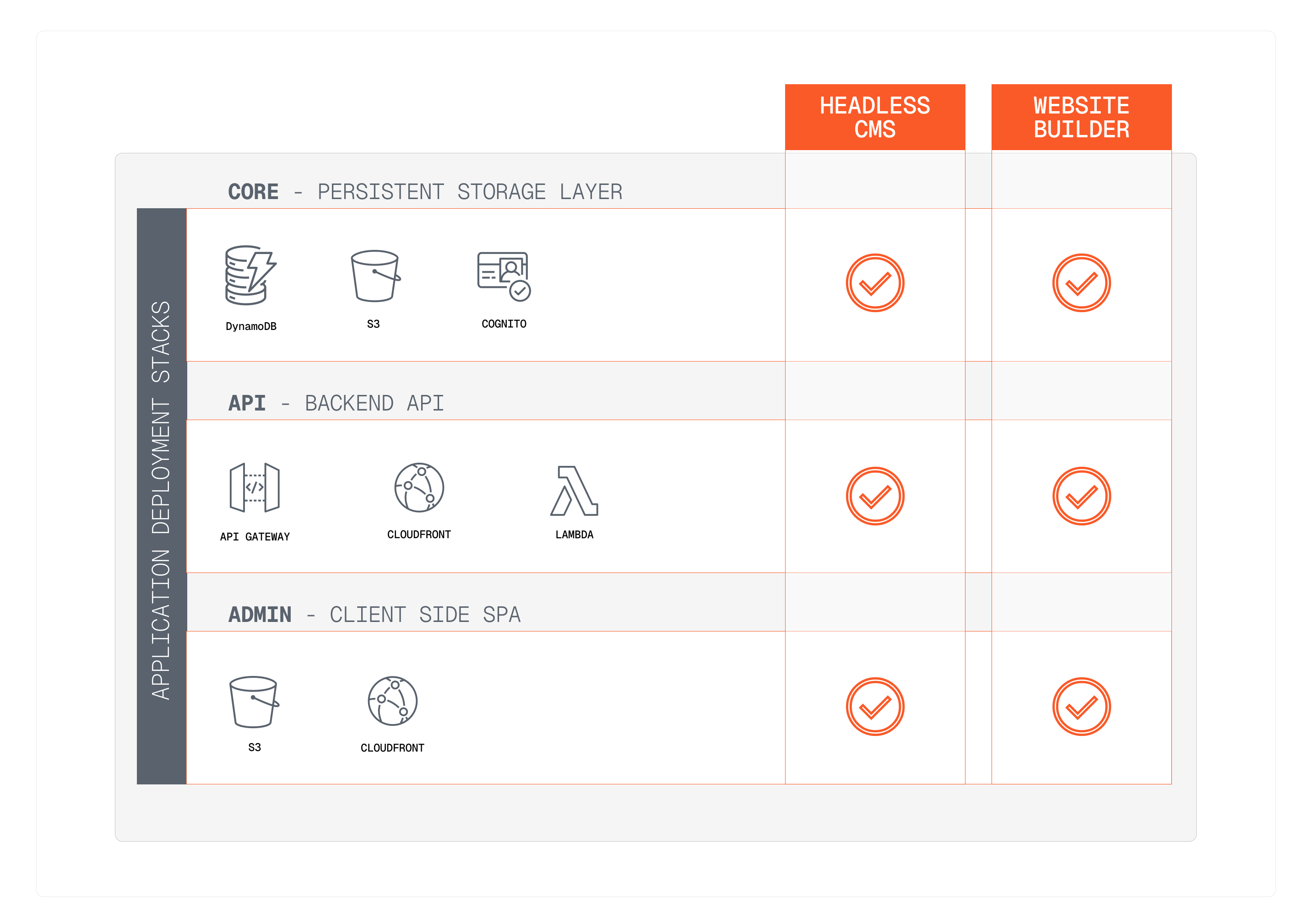
In this lesson, we will explore the concept of application deployment stacks in Webiny. By the end of this lesson, you will understand how application deployment stacks are structured and how they can be utilized in your Webiny projects.
In this lesson...
Here are the topics we'll cover
What are application deployment stacks.
What application deployment stacks exist inside Webiny.
How to deploy and manage application deployment stacks.
What are Application Deployment Stacks
Application deployment stacks in Webiny refer to the collection of infrastructure components and services that are required to run specific parts of the Webiny platform. Each stack is designed to handle a particular aspect, such as the Admin interface, API services, or core functionalities.
Application Deployment Stacks in Webiny
Webiny consists of three application deployment stacks, and they are:
- Core Stack: This stack includes essential services that are required for the Webiny platform to function, such as persistent storage, and user management.
- API Stack: This stack handles the GraphQL API services that power the Webiny applications, allowing for data retrieval and manipulation, or any other service that runs on the backend side.
- Admin Stack: This stack is responsible for the client-side Webiny Admin application, which provides the user interface for managing content, settings, and other administrative tasks.
Application Deployment Stacks vs Environments vs Applications
It's important to distinguish between application deployment stacks, environments, and applications in Webiny:
- Application Deployment Stacks: These are the infrastructure components such as Lambda, DynamoDB and similar, that are required to run specific parts of a Webiny application, such as the Admin interface or API services.
- Environments: These represent different deployments of your Webiny project, such as development, staging, and production.
- Applications: These are applications such as the Headless CMS, Website Builder, File Manager, ect. that run on top of the application deployment stacks.
Deploying and Managing Application Deployment Stacks
In this lesson, we are only providing an overview of the Webiny CLI commands. Please wait until the next lesson before running any of these commands, as we will guide you through the deployment process step-by-step.
To deploy and manage application deployment stacks in Webiny, you can use the Webiny CLI. The CLI provides commands to deploy, update, and manage each stack individually. For example, to deploy the Admin Stack into the dev environment, you would use the following command:
Stack order
When deploying stacks, it's important to follow the correct order to ensure that dependencies are met as certain stacks rely on resources from others. The recommended deployment order is:
- Core Stack
- API Stack
- Admin Stack
When you initially create your project it's best to run yarn webiny deploy without any stack specified, which will deploy all stacks in the correct order automatically. Once you have the initial deployment done, you can then deploy individual stacks as needed.
Destroying stacks
The same way how you can deploy individual stacks, you can also destroy them using the Webiny CLI. For example, to delete the API Stack from the dev environment, you would use the following command:
In terms of the order of deletion, it's best to destroy stacks in the reverse order of deployment to avoid dependency issues:
- Admin Stack
- API Stack
- Core Stack
Core stack
The core stack is the only stack with persistent storage (like DynamoDB tables, S3, Cognito). Because of that, when deleting the core stack, all the data in your Webiny instance will be lost (for that environment). So please be careful when deleting the core stack, especially in production environments.
On the other hand that means you can safely delete and redeploy the Admin and API stacks without losing any data, as all the persistent data is stored in the core stack.