Deployment environments
In this lesson, we will explore the concept of deployment environments in Webiny. By the end you will understand how to manage different environments for your Webiny projects.
In this lesson...
Here are the topics we'll cover
What are environments.
What are state files.
How to manage different environments.
What are deployment types.
What are Environments
In Webiny, an environment represents a specific deployment of your project. Each environment has its own set of infrastructure resources, configurations, and state files. This allows you to have multiple instances of your Webiny project, such as development, staging, and production environments.
Environment types
There are two main types of environments in Webiny:
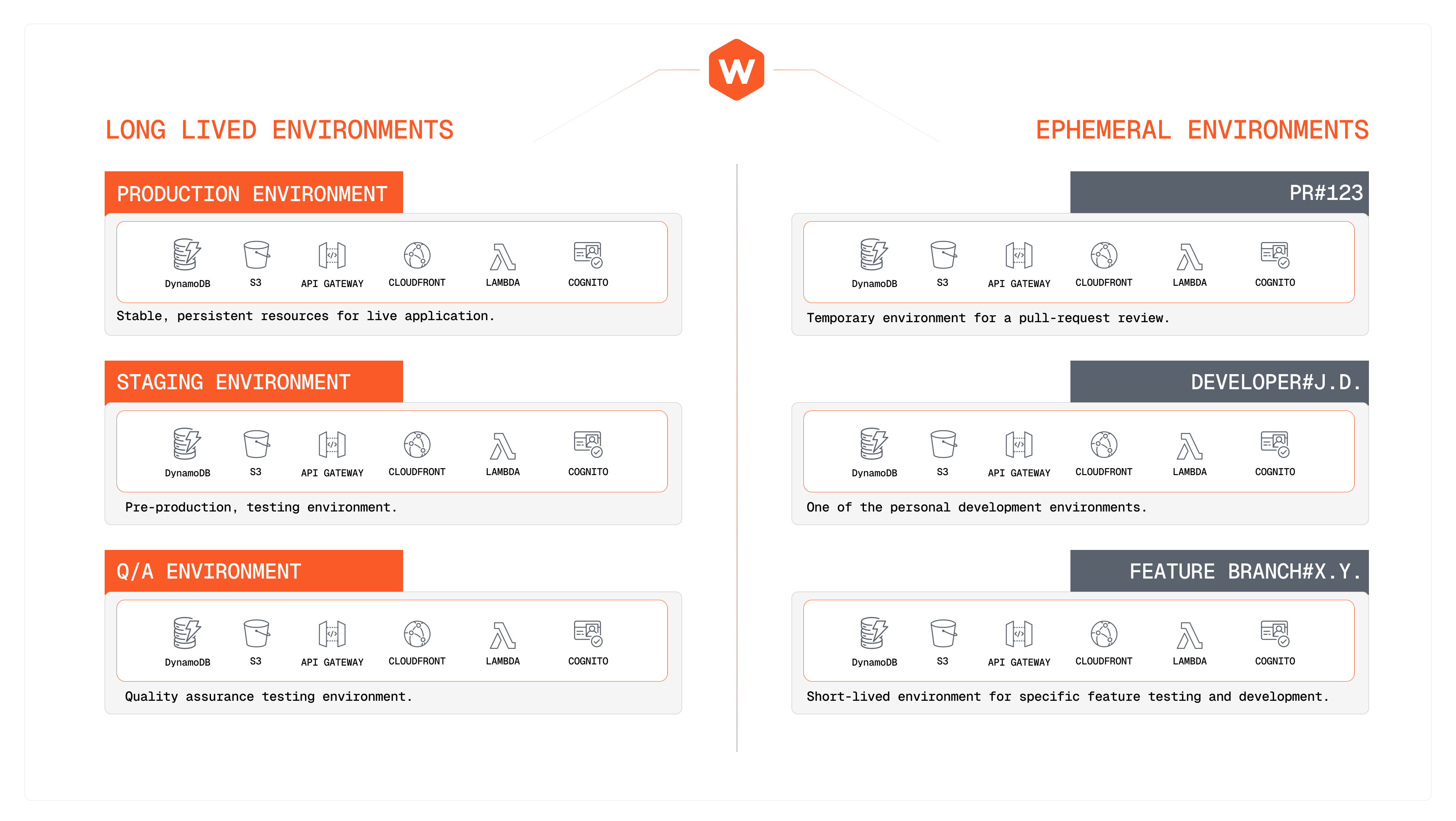
- Long lived environments: These are persistent environments that you maintain over time, such as development, staging, and production. They are typically used for ongoing development and deployment of your Webiny project and are managed through CI/CD, or at least should be as a best practice.
- Ephemeral environments: These are temporary environments that are created for specific purposes, such as testing or experimentation. They can be easily created and destroyed as needed. They are usually created on top of a code PR via the CI/CD system, or manually via the CLI by a developer working on a specific feature.
For the purposes of this course we'll mainly focus on ephemeral environments, as they are easier to create and manage for learning and experimentation.
It's time to take a quiz!
Test your knowledge and see what you've just learned.
If you are working on a new feature and want to create a temporary environment to test it, which type of environment would you use?
What are State Files
State files are JSON files that store the current state of your Webiny deployment. They contain information about the infrastructure resources that have been provisioned, their configurations, and other metadata related to your environment. State files are essential for managing your Webiny environments, as they allow you to track changes and ensure consistency across deployments.
State files are crucial for managing your Webiny environments. Losing them can lead to inconsistencies and potential issues during deployments or completely losing access to a deployment. Always ensure that you back up your state files and keep them in a safe location.
Storing State Files
By default, Webiny stores state files locally within your project directory (inside the .pulumi folder in your project). However, for better management and collaboration, especially in team environments, it's recommended to store state files in a remote storage solution, such as an S3 bucket for which Webiny provides an out-of-the-box adapter. This allows multiple team members to access and manage the same environment without conflicts.
For the purposes of this course, we will continue to use local state files to keep things simple.
It's time to take a quiz!
Test your knowledge and see what you've just learned.
What's the best way to share state files among team members working on the same Webiny project?
How to Manage Different Environments
Managing different environments in Webiny is straightforward. You can create, deploy, and switch between environments using the Webiny CLI. Here are some common commands for managing environments:
yarn webiny deploy --env <environment-name>: Deploys your Webiny project to the specified environment. If the environment does not exist, it will be created.yarn webiny info --env <environment-name>: Displays information about the specified environment, including endpoints and configurations.yarn webiny destroy --env <environment-name>: Destroys the specified environment and all associated resources. Use this command with caution, as it will permanently delete your deployment.
It's time to take a quiz!
Test your knowledge and see what you've just learned.
What command would you execute to get the admin url of the `production` environment?
What are Deployment Types
To create the required infrastructure resources for your project, Webiny provides ready-made infrastructure as code templates. These templates define the cloud resources needed to run your Webiny applications and can be customized to fit your specific requirements.
There are two infrastructure as code templates that are available out of the box:
- Development template: This template is optimized for local development and testing. It provisions a minimal set of resources to keep costs low while providing the necessary functionality for development purposes.
- Production template: This template is designed for production environments. It provisions a more robust set of resources to ensure high availability, scalability, and performance for your Webiny applications.
Each template has been optimized for its specific use case, and you can choose the appropriate template when deploying your Webiny project based on your needs. Webiny also exposes these templates as open-source, allowing you to inspect, modify, or extend them as needed.
One project usually has multiple environments, and each environment can be deployed using either the Development or Production template, depending on its purpose. You are not restricted to using only one template for all environments within a project, instead, you can mix and match templates as needed.
For the purposes of this course, we will primarily focus on the Development Deployment template to keep things simple and cost-effective.
When creating a new environment, make sure to choose the appropriate deployment type based on your use case. For development and testing, use the Development Deployment template. For production environments, use the Production Deployment template to ensure optimal performance and reliability.